


FamilyWall: Family Organizer
family & Co
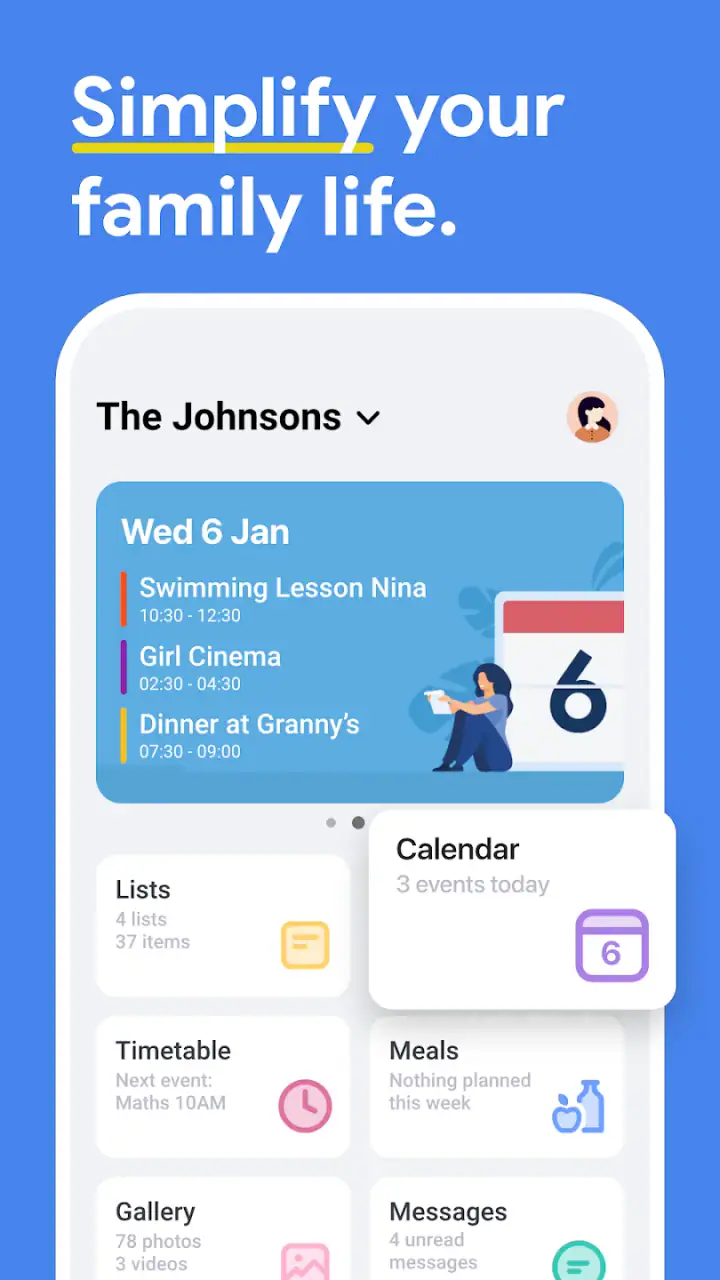
Getting a household organized usually fails for a simple reason: information is scattered. One person has a note on the fridge, another has a personal calendar, and someone else remembers the shopping list only after leaving the store. FamilyWall: Family Organizer brings those everyday details into one shared space, combining a family calendar with lists, tasks, meal planning, schedules, and documents. After spending time with it, I found that its real value is not any single tool. It is the way those tools can support one household routine.
This is a free lifestyle app from family & Co, available for Everyone and built for devices running Android 5.0 or later. Its current version is 12.0, and it has grown into a widely used family organizer, with over 5 million installs and a 4.8 average from roughly 80 thousand ratings. Those figures suggest a mature product, but they do not remove the need to set it up thoughtfully. The app becomes useful when everybody agrees on what belongs there and how shared information will be maintained.
What to expect from FamilyWall
FamilyWall: Family Organizer is best understood as a shared household dashboard rather than a replacement for every calendar, notes app, or task manager you already use. The central idea is that family members can see the practical information that affects them together: appointments, chores, shopping needs, meal plans, schedules, and important documents.
I would recommend it most to families who repeatedly exchange the same questions: “Who is picking up the children?”, “What are we eating tonight?”, “Did anyone buy detergent?”, or “Where did we save that document?” A shared system is particularly helpful when several adults coordinate different routines, or when children need visibility into age-appropriate responsibilities.
The app is less compelling for somebody who only wants a private calendar. If your needs are limited to personal appointments, a standard calendar may feel faster and less crowded. It can also be unnecessary for a household that already has a reliable combination of messaging, calendar, and notes tools. The advantage here comes from bringing those family-oriented activities together, not from making one isolated feature dramatically deeper than every alternative.
Related News

Instagram Is No Longer a Photo App. It Is an Attention Engine

Microsoft Teams Mobile: When Collaboration Becomes Navigation

How the NFL App Adapts to Android and iOS Updates

Temu: Elevate Your Shopping Experience to Billionaire Status

Why Traffic Rider Works Best as a Precision Reflex Game

How Google’s Find Hub Transforms Everyday Searches
The free starting point makes it easy to test the idea without committing money immediately. In-app purchases range from $1.99 to $44.99 per item, so I would treat the free experience as a trial of the household workflow before deciding whether any paid option is worthwhile. The important question is not whether the app contains many tools, but whether your family will actually return to the shared space instead of falling back to private notes and chat messages.
The first setup should be deliberately small
My strongest advice for a first-time user is not to enter the entire family history on the first day. Start with the people who genuinely need to coordinate, then add only the information that will produce a visible benefit this week. A crowded workspace can make the app look complicated before anyone has experienced its usefulness.
Begin with a small household group and agree on naming. For example, use clear labels for school, work, medical, transport, or household appointments instead of creating a long list of vague entries. This matters because a shared calendar is only helpful when another person can understand an item without asking for an explanation.
Gallery
Next, choose one recurring pressure point. For some families that will be shopping; for others it will be evening meals, school schedules, or dividing chores. Do not try to solve all of those at once. I found that a single visible improvement creates more adoption than a perfectly designed system nobody remembers to open.
Documents deserve a little planning too. If you use that area, decide which items are genuinely useful for shared access and which should remain private elsewhere. A family organizer is convenient for household reference material, but convenience should not encourage careless storage of sensitive information. Keep the shared collection purposeful and review it occasionally rather than treating it as an unlimited archive.
One practical setup habit is to establish who maintains what. If everybody assumes somebody else will update the meal plan or remove completed tasks, the shared view soon becomes stale. A simple agreement—one person checks the shopping list before the weekly shop, another updates schedules—turns the app from a passive noticeboard into a working routine.
Your first meaningful success can happen in one evening
The quickest way to understand the app is to create a small plan around a real day. Add the next important family appointment, create a short shopping list for the next meal, and assign or record one household task. Then ask another family member to look at the same information and act on it. That final step is important: the success is not entering data, but avoiding a separate message or reminder.
A realistic example would be a busy weekday. I might put a child’s activity on the shared schedule, add ingredients for dinner to the shopping list, and record who is responsible for collecting the child. My partner can then check the plan while shopping, and the person handling transport can see the commitment without searching through a conversation. The app earns its place when that small chain prevents one missed handoff.
Meal planning is especially useful when connected to shopping rather than treated as a decorative weekly view. I would plan only a few meals at first, then turn the ingredients into a practical list. This exposes a trade-off: detailed planning can reduce last-minute decisions, but it also creates maintenance work when plans change. The sensible approach is to plan enough to guide the week while leaving room for leftovers, spontaneous meals, or a change in schedule.
Tasks work best when they describe an observable result. “Handle house stuff” is too broad to be useful. A task such as taking out recycling, checking a school bag, or buying a specific item has a clearer finish line. I also prefer assigning responsibility rather than leaving every item as a general family obligation. Shared responsibility sounds fair, but in practice it can mean nobody feels accountable.
Schedules can help when a family’s day is structured around repeated activities. They are less useful if every minor event is added with the same visual importance. Reserve the shared view for information that affects another person. Private reminders are still better for small personal actions that do not need family attention.
Where new users may hesitate
The main source of confusion is deciding which tool to use for which kind of information. A calendar entry represents something happening at a time. A task represents something that needs completion. A shopping item represents something to obtain. A meal plan represents an intended choice that may lead to shopping. These categories overlap in daily life, so the app cannot make every decision for you.
When I felt unsure, I used a simple test: if another person needs to know when it happens, I place it in the schedule; if someone needs to do it, I make it a task; if it must be purchased, I use the shopping list. That separation keeps the shared space readable. Putting every thought into the calendar creates noise, while putting time-sensitive commitments into a general list makes them easy to miss.
Another common problem is overloading the first screen with old or low-value information. A family organizer should answer today’s practical questions quickly. If the household sees dozens of outdated tasks, duplicate appointments, and abandoned meal ideas, people will stop trusting it. I recommend a short weekly reset: remove completed tasks, update changed plans, and trim anything that no longer helps coordination.
There is also a social difficulty that no interface can completely solve. One person may enthusiastically maintain the system while everyone else continues using text messages. I would introduce the app through a shared need rather than a demand that the whole household migrate immediately. Start with one workflow—perhaps shopping or school transport—and let the convenience demonstrate why participation matters.
Families should also think about notification habits. Too many alerts can make a shared organizer feel intrusive, while too few can make it irrelevant. I would begin with only the reminders needed for genuinely time-sensitive commitments and adjust after a week of use. The goal is not to make every change announce itself; it is to make important changes visible before they cause a problem.
Three details that make the workflow more effective
First, use the app as a handoff tool. Many household mistakes occur between two people: one person knows something, but the person who must act on it does not. Recording the responsibility in the shared system creates a visible handoff. This is more reliable than assuming that a quick verbal comment will survive a busy morning.
Second, connect planning to shopping in both directions. Before shopping, review the meal plan and remove ingredients you already have. After shopping, adjust the plan if an item was unavailable or a meal changed. This prevents the common mistake of treating a shopping list as fixed while the week keeps moving. The useful habit is not making a perfect list; it is keeping the list aligned with the actual household plan.
Third, use documents as reference points rather than dumping grounds. A shared document area can save time when several people need the same household material, but its value depends on clear names and regular cleanup. I would use descriptive labels and avoid storing multiple near-identical copies. That small discipline makes retrieval faster when somebody needs information in a hurry.
A fourth insight is to separate family visibility from personal productivity. Not every task belongs in a shared organizer. If I add every private reminder, the family view becomes cluttered and other members learn to ignore it. I keep shared entries for commitments, errands, and responsibilities that affect more than one person. Personal work remains in the tool designed for it.
How it compares with familiar alternatives
Compared with a normal calendar, FamilyWall is more household-focused because the calendar sits alongside shopping, tasks, meals, schedules, and documents. A conventional calendar may offer stronger individual scheduling habits, especially for someone already invested in a personal ecosystem, but it can require extra effort to connect an appointment with dinner planning or errands.
Compared with a messaging group, the app has a better chance of preserving information. Chat is excellent for quick questions and last-minute changes, but shopping items and responsibilities can disappear beneath newer messages. A shared organizer gives recurring information a stable home. The trade-off is that every person must remember to check it, whereas a message may demand attention immediately.
Compared with a dedicated task manager, the household context is the advantage. A task app may be better for complex projects, priorities, subtasks, or professional workflows. FamilyWall is more approachable when the task is “buy ingredients,” “remember the appointment,” or “coordinate who does the pickup.” I would not choose it as my main system for a large work project.
Compared with a paper planner or fridge list, the app is easier to update when people are in different places. Paper remains wonderfully visible in a shared room and requires no device, though it cannot follow a family member to the store or update for everybody at once. The right choice depends on whether your household’s problem is visibility, mobility, or simply a lack of agreement about routines.
Who should use it, and who should skip it
I think it is a strong fit for families with changing schedules, shared errands, meal-planning responsibilities, or several adults who need the same information. It can also help households that are tired of repeating instructions and want a calmer way to divide practical work. The Everyone content rating makes it suitable as a general family-oriented app, although parents should still decide which information children should see and which responsibilities are appropriate for them.
I would skip it if you are looking for a highly specialized calendar, an advanced project-management system, or a private personal notes app. It may also frustrate a household that refuses to adopt a common routine. No shared organizer can compensate for people who do not update plans, ignore assignments, or continue keeping the real information somewhere else.
Before paying for anything, I would run a complete weekly experiment using the free version: one shared calendar item, one shopping cycle, one meal plan, and a few clearly assigned tasks. At the end of the week, ask whether the app prevented missed information or merely duplicated your existing tools. That answer is more useful than judging the feature count in isolation. Since optional purchases can cost from $1.99 to $44.99 per item, the household should identify a real benefit before spending.
My final experience after settling into the routine
FamilyWall works best when treated as a family habit, not as an app that magically organizes everyone after installation. The first success should be modest: one shared plan that saves a message, prevents a forgotten item, or clarifies who is responsible. From there, meal planning, schedules, tasks, and documents can grow around the routines that genuinely need support.
I appreciate the balance between a simple everyday purpose and several connected tools. I also think the breadth creates its main weakness: without agreed rules, the shared space can become cluttered, and users may struggle to know where each piece of information belongs. The solution is to begin with one workflow, use precise labels, and review the space regularly.
With over 3 thousand written reviews and a long history since its release on December 2, 2011, the app has had time to develop beyond a basic shared calendar. My recommendation is straightforward: install it if your household repeatedly loses track of schedules, shopping, meals, or responsibilities. Give it a real week with a small, shared goal. If that first handoff saves even one round of family messages, you will know whether this organizer fits your home.
FAQs for FamilyWall: Family Organizer
What features does FamilyWall offer for family organization?
FamilyWall provides a comprehensive suite of tools designed for family organization, including a shared calendar, to-do lists, grocery lists, and a meal planner. It also offers a family locator feature, photo and video sharing, and secure messaging, making it a versatile app to keep family members connected and organized.
Is FamilyWall available on both Android and iOS platforms?
Yes, FamilyWall is available for download on both Android and iOS platforms. This ensures that all family members, regardless of their device preference, can access and use the app seamlessly. The app is designed to sync across devices, providing a uniform experience.
How does FamilyWall ensure the security and privacy of my family's data?
FamilyWall prioritizes user privacy and data security, employing encryption protocols to protect personal information. The app ensures that only authorized family members can access shared content. Additionally, it complies with major data protection regulations, offering peace of mind to families using the app.
Does FamilyWall offer a free version, and what are the limitations?
FamilyWall offers a free version with essential features like the shared calendar, to-do lists, and basic location services. However, the premium version unlocks additional features such as unlimited storage for photos and videos, advanced location tracking, and enhanced support, offering a more robust experience.
Can FamilyWall be used by non-tech-savvy family members easily?
FamilyWall is designed with a user-friendly interface that aims to be intuitive for users of all ages, including those who are not tech-savvy. The app provides straightforward navigation and clear instructions, making it accessible for everyone in the family to use without difficulty.
Pros
- Intuitive interface for easy navigation.
- Real-time location sharing for family safety.
- Shared calendar for organized events.
- Secure private messaging feature.
- Customizable to fit family needs.
Cons
- Limited free version features.
- Requires internet for full functionality.
- Occasional sync issues reported.
- No direct integration with all calendars.
- Ads can be intrusive in free version.


